Job Bored
A modular desktop browser built with Qt 6 and Chromium Embedded Framework (CEF), designed around atomic UI architecture to support highly customizable multi-window workspaces.
What was the purpose
Like many new graduates, I found myself spending countless hours searching for jobs across LinkedIn, Indeed, Glassdoor, and company career pages. Every day followed the same pattern: open dozens of tabs, search the same positions across multiple websites, keep a spreadsheet of applications, monitor my inbox for updates, and repeat.
There wasn't a meaningful advantage to be gained. Most "solutions" were simply paid subscriptions or premium services that didn't fundamentally improve the application process.
Instead of accepting that workflow, I wanted to rethink it.
The original idea wasn't just to build another browser—it was to build a dedicated workspace designed specifically for job searching. One of my favorite aspects of using an IDE is how it creates an environment focused entirely on the task at hand. I wanted to bring that same focused experience to job applications by creating an application where every feature served a single purpose: helping users find and apply for jobs more efficiently.
From that idea, the vision quickly expanded beyond browsing into workflow automation. Rather than acting as another window to the web, the browser would become an intelligent assistant throughout the entire application process.
Some of the planned features included:
Unified job discovery — Scan sites like LinkedIn, Indeed, Glassdoor, and company career pages, aggregate listings into a single feed, and eliminate duplicate postings so users only need to apply once.
Application tracking — Replace manually maintained spreadsheets with a dashboard that automatically tracks where applications were submitted, interview stages, and responses.
Inbox intelligence — Monitor recruiting emails, surface only the updates that matter, and automatically associate them with the correct application.
AI-assisted applications — Use an AI agent to complete repetitive application forms and reduce the friction of applying to dozens of positions.
Resume optimization — Analyze resumes and cover letters, tailoring them to individual job descriptions before submission.
While the product vision was ambitious, an equally important goal was exploring the architecture required to support it. I wanted a modular desktop application where browser instances, UI components, and future AI capabilities could evolve independently without becoming tightly coupled. Much of the project became an exercise in designing software that could scale with new ideas rather than simply implementing features.
What I learned from the code
I started by researching the job market and looking for different pain points across roles. I knew my experience as a software developer in application environments would be different from someone like a nurse, so I tried to understand those gaps and how they show up in real workflows.
My favorite area ended up being UI. I’ve always enjoyed building things for people, especially something that feels custom tailored while still staying general and reusable. It takes more effort, but the result is usually worth it. To go deeper on this, I read Atomic Design by Brad Frost, which really shaped how I think about structuring UI systems through reusable components in both design and code. I went through it over a weekend and tried to really absorb the way it breaks everything down.
On the coding side, things got a bit chaotic in a good way. I had no real business building a browser, but I wanted to try it anyway. Early on I struggled just getting Qt6 installed. The official download flow wasn’t working for me and I ended up digging through forums, trying terminal installs and different packages before eventually finding Microsoft’s vcpkg repository https://github.com/microsoft/vcpkg which ended up being the thing that saved me from switching frameworks entirely.
I also looked at other options like Electron with React since I had used that before and Win32 frameworks, but it didn’t feel like the right fit for what I was building.
Once Qt6 was up and running, the next challenge was getting a CEF browser working inside it. That part ended up being one of the most fun stages of the project. I was deep into OS level behavior, figuring out how Windows handles input and how to properly signal interactions for a borderless window. I had removed the top bar completely so I had to manually handle dragging and tell Windows when the user was moving the window. It was messy, low level work, but honestly one of the most exciting parts of the build.
The UI Deep Dive :P
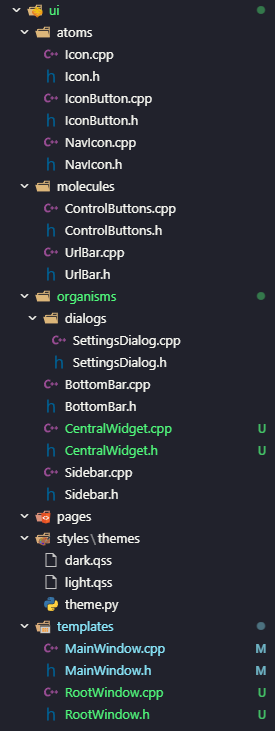
Atomic design gave the project its actual structure: atoms (buttons, icons) never know about molecules (search bars, control clusters), molecules never know about organisms (the sidebar, bottom bar), and nothing below a template touches CEF or window state directly. Signals flow up, behavior gets handled down.
The window is frameless by design — no native title bar, just a left sidebar for tab switching and a bottom bar for navigation and the URL input. I wanted the chrome itself to feel closer to an IDE than a browser: minimal, task-focused, nothing competing with the content area.
The sidebar holds one tab per open browser instance, keeping switching to a single click instead of hunting through a horizontal tab strip. The bottom bar keeps navigation controls, settings, and the URL bar in one row, low enough to stay out of the way while browsing.
